Discover ProteQ VISO — 3D Digital Inspection That Lets You See Real Depth
|
|
|
Glasses-free stereo 3D · Live sharing · Precise inspection —
see flaws before they turn costly
|
|
|
Why 3D matters
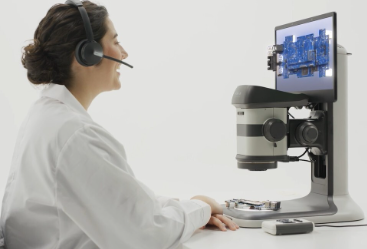
ProteQ-VISO is the newest addition to the Vision Engineering microscope range — designed to show depth with complete clarity.
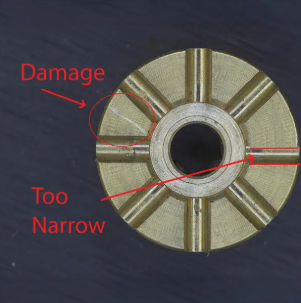
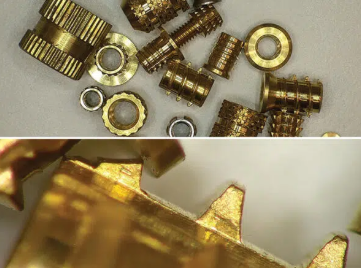
Human vision is naturally stereoscopic, so we understand objects better when we see true depth. Many defects — such as burrs, pits, voids, raised edges, or uneven surfaces — are difficult to identify under standard 2D or mono views. Shadows and reflections can be misleading, causing issues to be missed.
With real 3D stereo imaging, ProteQ-VISO reveals the actual form, height, and structure of components in real time. This makes defects immediately visible, improves decision-making, and reduces costly rework.
|
|
|
|
3D Viewing in Every Detail
|
|
|

|
10:1 zoom — overview to micro detail
|
|
|
Magnification up to 314X
|
|
|
Quick-clip ring light with optimised illumination
|
|
|
Optional Oblique & Direct Viewer (ODV) for angled inspection
|
|
|
Multiple stand options for varied workspaces
|
|
|
Long standoff distance — ideal for laminar-flow cabinets
|
|
|
Software add-ons available for advanced measurement and analysis
|
|
|
|
Compliance you can count on
|
|
|
|
|
ProteQ-VISO requires minimal setup and is easy to use
|
|
|
Very little training is required to enjoy productivity benefits
|
|
|
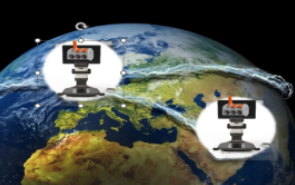
2D or 3D can be captured to a USB drive, and the DRV-Z1 can also be connected to a PC for local sharing, or for access to dimensioning software such as ViPlus or Dimension Two
|
|
|
|
|
|
|
|
|
|
3D stereo viewing improves hand–eye coordination for inspection, rework and assembly tasks. Whether soldering microelectronics or polishing fine surfaces, true depth perception makes it easier to guide tools accurately in 3D space.
The 10:1 zoom allows operators to move from a wide field to fine features without changing setup.
|
|
|
Adapts and enhances
VISO integrates seamlessly into existing inspection processes, enhancing reporting quality across teams. Interface modes, workflow controls and reporting tools make the system easy to use and suitable for shared or regulated environments
|
|
|
|
|
Kiosk mode — locked interface for repeatable operation
|
|
|
PC mode — extended control and advanced functionality
|
|
|
On-screen overlays and annotation for supplier/customer reporting
|
|
|
Dimensioning and analysis tools for audit trails, visual records and process workflows — ideal for supplier reporting, regulated processes, shared-use labs, training environments, and goods-in inspection.
|
|
|
|
|